

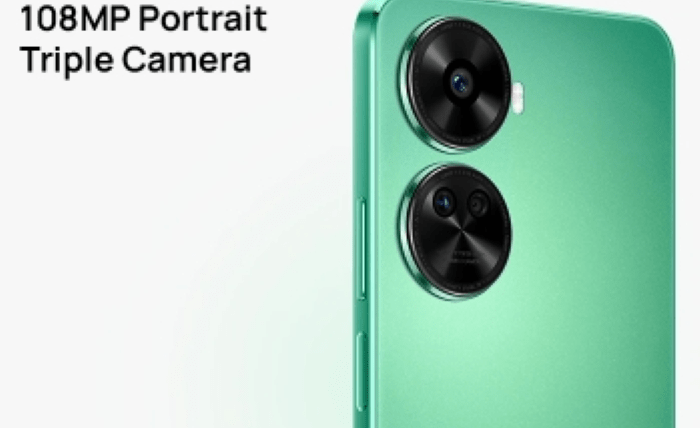
Low light photography is one of the trickiest areas for capturing clear and vibrant images. Whether you’re shooting during twilight, in a dimly lit room, or at night, insufficient lighting can result in blurry, grainy, or underexposed photos. However, mastering low light photography doesn’t require fancy equipment—it’s all about learning a few tricks to optimize your shots. For those looking to take stunning photos even in challenging conditions, having the right camera features can make all the difference. The HUAWEI nova 12 SE, for instance, offers a 108MP Portrait Triple Camera that excels at capturing sharp details and vibrant colors, even in low light. It’s perfect for those who love snapping portraits and nighttime scenes without compromising on quality. In this article, we’ll explore practical tips and techniques to help you take beautiful, well-lit photos in low light environments.
Adjusting Camera Settings for Better Exposure
Understanding your camera settings is the first step to improving your low light shots. Many smartphone cameras today allow manual adjustments to achieve better exposure, giving you control over how much light enters the lens.
Using a Lower Shutter Speed to Let in More Light
Shutter speed determines how long your camera sensor is exposed to light. In low light conditions, lowering the shutter speed lets in more light, making your photo brighter. For example, a shutter speed of 1/10 second will capture significantly more light than 1/100 second. However, slower shutter speeds can cause motion blur if you or your subject move. To counter this, shoot still objects or ask your subject to stay as steady as possible. If you’re photographing cityscapes at night, slower shutter speeds work beautifully to capture light trails from passing cars or the glow of buildings. Most smartphones offer “Pro” mode or “Night mode,” where you can manually adjust the shutter speed for the desired effect.
Increasing ISO for Brightness Without Overexposure
ISO controls how sensitive your camera sensor is to light. In low light situations, increasing the ISO allows your camera to brighten the photo without relying on additional light sources. For example, an ISO of 800 or 1600 works well for nighttime city shots or indoor scenes. However, higher ISO settings can introduce grain or “noise” into your photos, reducing overall quality. The key is to find a balance. If your camera has an automatic ISO feature, use it as a guide and tweak manually until you achieve the desired brightness. Apps like Lightroom or Snapseed can later help reduce noise during post-processing, improving clarity.
Stabilizing Your Camera to Avoid Blurry Shots
Blurry images are a common issue when shooting in low light, as the camera compensates by using longer exposure times. A shaky hand can ruin an otherwise perfect shot.
Using a Tripod or Stable Surface for Support
A tripod is one of the best tools for low light photography. It keeps your phone perfectly still, allowing you to use slower shutter speeds without introducing blur. Portable tripods are affordable, lightweight, and ideal for capturing city skylines, starry skies, or dimly lit interiors. If you don’t have a tripod, improvise! Rest your phone on a stable surface, such as a table, ledge, or stack of books. You can even lean against a wall or hold your phone with both hands, elbows tucked in to minimize movement. For long exposure shots—like capturing a waterfall or nighttime light trails—stability is key to achieving stunning results.
Activating Optical or Electronic Image Stabilization
Most modern smartphones are equipped with Optical Image Stabilization (OIS) or Electronic Image Stabilization (EIS) to minimize shake. OIS works by physically adjusting the camera lens to counteract movement, while EIS stabilizes footage digitally. Be sure to activate these features when shooting in low light. They’re particularly helpful when taking handheld photos or videos in situations where using a tripod isn’t practical. Even small movements, like pressing the shutter button, can affect your photo’s sharpness—so stabilization can be a game-changer.
Leveraging Available Light Sources
When shooting in low light, you need to get creative with the light that’s already around you. Whether it’s streetlights, lamps, or reflections, making the most of these sources can greatly enhance your photos.
Positioning Near Artificial Light or Streetlights
Positioning your subject near a light source can brighten the photo and add interesting effects. For example, when taking portraits outdoors at night, use streetlights or neon signs as backdrops. Not only do they provide additional light, but they can also create stunning mood lighting. Indoors, position your subject near lamps, candles, or even a computer screen for soft and warm light. A simple lamp with a lampshade can mimic professional lighting setups, casting flattering shadows and reducing harsh contrasts. Experiment with angles to see how the light hits your subject for the best results.
Using Reflectors or Smartphone Flash Creatively
Reflectors are a photographer’s secret weapon. A white piece of paper, a foil-covered board, or even a mirror can reflect light onto your subject, brightening darker areas. For example, if you’re shooting indoors and the light source is on one side, place a reflector opposite to bounce light evenly. When natural light isn’t an option, use your phone’s flash creatively. Instead of pointing it directly at the subject, diffuse it with tissue paper or bounce it off a wall to create softer lighting. For portraits, this trick can reduce harsh shadows and add a professional touch to your photos.
Editing and Post-Processing for Final Touches
Post-processing is essential to enhance low light photos. Editing apps allow you to adjust brightness, contrast, and sharpness to make your images stand out.
Adjusting Brightness, Contrast, and Noise Reduction
Begin by increasing the brightness to lighten the image without losing details. Adjust the contrast to add depth and make the subject pop. Most editing apps also include noise reduction tools to smooth out grainy areas caused by high ISO settings. For example, if you captured a night market scene, increasing brightness and fine-tuning contrast can make colors more vibrant while reducing unnecessary noise. Small adjustments can turn a dull photo into a stunning image.
Using Apps to Enhance Photo Details and Sharpness
Popular apps like Adobe Lightroom, Snapseed, or VSCO offer advanced tools to sharpen details, improve clarity, and adjust tones. For nighttime shots, try increasing the shadows slightly to reveal hidden details without washing out the photo. Additionally, use the sharpening tool carefully to bring back lost textures, like the patterns on a building or the ripples of water under moonlight. Always aim for a natural look—overediting can make the photo appear unrealistic.
Conclusion
Shooting in low light conditions may seem challenging, but with the right techniques, anyone can take impressive photos. By adjusting your camera settings, stabilizing your phone, using available light creatively, and editing with care, you can transform dark, grainy shots into clear, vibrant images. Don’t be afraid to experiment—low light photography offers endless creative opportunities. And if you want to elevate your photos, a smartphone with a powerful camera, like the HUAWEI nova 12 SE’s 108MP Portrait Triple Camera, can help you capture stunning shots with ease. With a bit of practice and these tips, low light photography will no longer be a challenge but an exciting way to showcase your creativity.